Blog
What are Passkeys? An Easy-to-Use FAQ Guide
Passwords are a dying feature. We reuse them, forget them, write them on sticky notes, and could accidentally share them in places that scammers can easily find. Passkeys are the industry’s fix to the password problem: a way to log in using your device and your face, fingerprint, or PIN instead of a string of characters you have to remember. Apple, Google, and Microsoft have all rolled out support for them, and more banks, health plans, and healthcare portals add passkey login every quarter. But what exactly is a passkey? And how can you expect them to work for you, especially now that they are popping up across login screens you interact with every day? Here, we lay out answers to just those questions and more, plus some information about Relay’s recent adoption of passkeys as a more secure and seamless way to support customer login to the Feed.
What is a passkey?
A passkey is a sign-in method tied to your device instead of something you type. You unlock your account the same way you unlock your phone — a fingerprint, a face scan, or a PIN — and that’s it, you’re in.
How does a passkey actually work?
Under the hood, a passkey is a matched pair of cryptographic keys. To get a slightly technical, when you create a passkey, your device generates a private key that never leaves it and a public key that gets handed to whatever you’re logging into. When you come back to sign in, your device uses that private key to prove it’s really you — unlocked locally by your fingerprint or face — without ever sending a password or secret that could be caught in transit. Nothing to intercept, nothing to leak.
Is there a simple way to picture how passkeys, passwords, and biometrics are different?
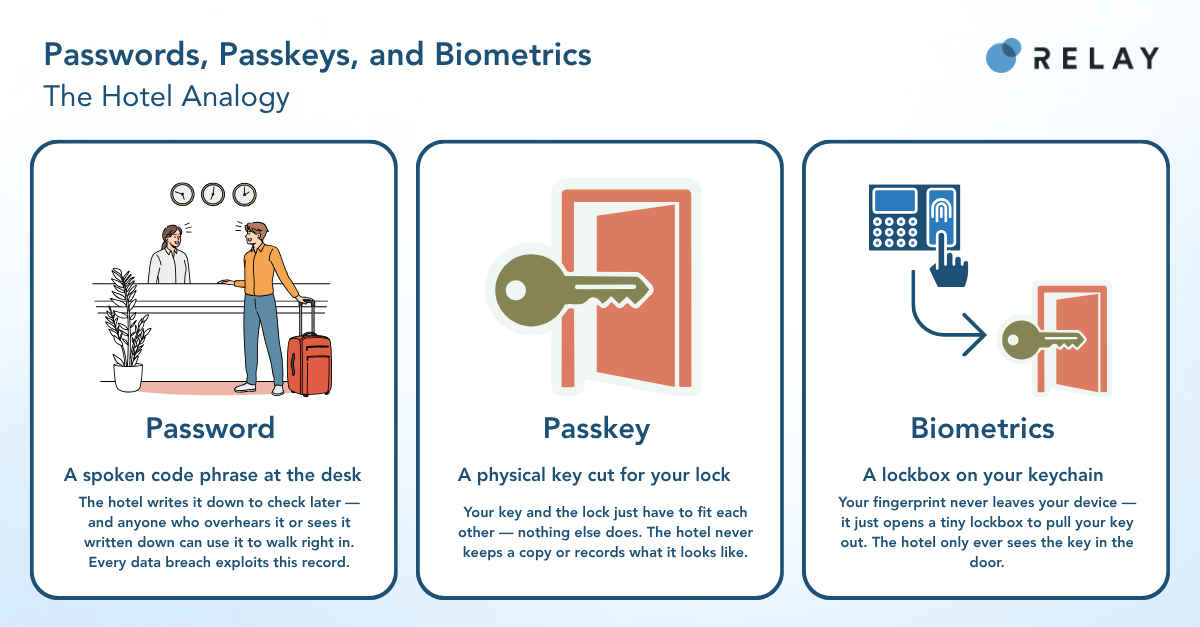
Think of it like a hotel room. A password is a spoken code phrase you give the front desk every time — “the code is Blue Falcon 7.” The catch: the hotel has to keep a record of that exact phrase to check it later, and anyone who overhears you say it, or sees it written down, can walk right in too. That’s basically what happens in every data breach you’ve heard about.
A passkey is more like a physical key cut specifically for your room’s lock. The hotel never keeps a copy of it or writes down what it looks like — your key and the lock just have to fit each other, and nothing else does.
Biometrics are the part people usually get confused about. Your fingerprint isn’t the key, and it never gets sent to the hotel. It’s more like a tiny personal lockbox on your keychain that only opens when you touch it — it just lets you pull your actual key out of your pocket. The hotel only ever sees the key working in the door. It never touches your finger.
How is a passkey different from a regular password?
A password is a shared secret — the same characters live on your device and on the company’s server, which is exactly why it’s a problem. It can be guessed, reused across ten different sites, or scooped up in a breach. A passkey never leaves the device it was created on, so there’s no secret sitting on a server waiting to be stolen, and nothing typed on-screen for a fake login page to grab.
Are passkeys actually more secure than passwords or text codes?
Yes, for the most part. Passkeys are built to resist the two things that cause most account takeovers: phishing and credential stuffing (that’s when hackers try a stolen password on a bunch of other sites, hoping you reused it). Since there’s no password or code entered anywhere, there’s nothing for a scam page to steal and nothing that works if it leaks. One-time text codes are better than a password alone, but they can still be intercepted or talked out of you — those “your package is delayed, click here to verify” texts are a good example. Passkeys skip the code entirely, so that whole attack disappears.
Do I need to download something to use a passkey?
Nope. Passkeys run on stuff your phone or laptop already has — Face ID, Touch ID, a PIN. Nothing extra to install.
Does anyone ever get my fingerprint or face scan?
No. That step happens entirely on your own device. It only unlocks your stored passkey — it’s never sent anywhere, it isn’t stored anywhere, and no company you log into ever sees it.
What happens if I lose my phone or switch devices?
Depends a bit on the platform. If your passkey is tied to an account like Apple, Google, or Microsoft, it usually syncs to your other devices signed into that same account. If it’s not synced, it’s tied to that one device — so on a new phone, you’d sign in with your password or another verification method first, then set up a new passkey there. Either way, losing your phone doesn’t lock you out forever; normal account recovery still works.
Do I have to use a passkey, or can I keep my password?
Almost always optional. Most sites that support passkeys let you keep your current password or verification method and set up a passkey whenever (or if) you feel like it — usually with a quick prompt the next time you log in.
Why is this becoming such a big deal now?
Two things lined up: Apple, Google, and Microsoft all agreed on the same standard (FIDO2/WebAuthn, if you want the technical name), and phishing/account-takeover fraud has gotten bad enough that passwords and even text codes aren’t cutting it anymore. For companies in regulated spaces like banking and healthcare, passkeys are a rare win-win — better security and a faster login, at the same time, instead of the usual trade-off.
Are passwords going away completely?
Not anytime soon. Support still depends on your device and each company’s own setup, so passwords and codes will stick around as a backup for a while. What’s actually changing is which one comes first — passkeys are increasingly the default option, with your password waiting in the wings just in case.
Relay’s Take
A Relay Feed is already built to be about as frictionless as it gets: no app to download, no account to create, no login needed to open it the first time. You get a link, you tap it, your personalized Feed is right there. That was always the point — every extra step between a message and getting something done is a chance for someone to fall off.
Passkeys close the one gap that was left: coming back. Before passkeys, a returning customer may have had to password or input another verification code to get back into their Feed — exactly the kind of friction the Feed was built to avoid everywhere else. Now it’s one tap. A fingerprint, a face scan, a PIN, and you’re back in — no password to remember, no code to input.
Setup follows the same idea: nothing to configure, nothing forced. After a successful login, you’re just asked if you’d like to create a passkey. Say no and nothing changes. Say yes and create or remove it later from the Feed menu whenever you want. Prefer your password or verification? Keep using it — that option never goes away.
This update impacts the customers that matter most to the business, the ones who keep coming back to the Feed. The more seamless the login, the more engagement that customer will have on the Feed and continue that engagement. For Relay’s clients in healthcare, financial services, and life sciences, that means their most engaged customers no longer have to choose between a fast way back in and the security their industry demands. It’s the same idea behind everything Relay does — keep shrinking the distance between what a customer means to do and actually getting it done, without making security the trade-off.
Have a question about passkeys that isn’t answered here? Contact: sales@relaynetwork.com.